Enhanced public service for JSON Conversion in webMethods Integration Server 10.15

Discover, Share, and Collaborate with the Software AG Tech Community
The Software AG Tech Community is your single best source for expert insights, getting the latest product updates, demos, trial downloads, documentation, code samples, videos and topical articles.
But even more important, this community is tailored to meet your needs to improve productivity, accelerate development, solve problems, and achieve your goals.
Join our dynamic group of users who rely on Software AG solutions every day, follow the link or you can even sign up and get access to Software AG's Developer Community.
Thanks for stopping by, we hope to meet you soon.
products versions - webMethods Integration Server 10.15
Is there a service to enhance the JSON conversion? Yes, there is a new service introduced in 10.15, the “pub.json:jsonToDocument” service. This service is an improved version of the existing services “pub.json:jsonStringToDocument” and “pub.json:jsonStreamToDocument”.
How pub.json:jsonToDocument is different from the existing services?
Let’s see how pub.json:jsonToDocument is different from the existing services:,
• The “pub.json:jsonToDocument” accepts both JSON stream and JSON string as an input.
• This service provides two options to convert a JSON input to a document.
By providing the document as a reference.
By choosing a datatype to which you want to convert the input.
• When you convert the JSON input to an IData document by providing the reference document, the “pub.json:jsonToDocument” service accepts all types of documents, whereas the existing services can accept only the JSON schema documents as a reference.
• The “pub.json:jsonToDocument” service has the intelligence to handle the duplicate fields
• If any field in the reference document is mentioned as a date, then this service can convert that specific string field into a Date.
• For more information on the formats, see BIS guide [MR1]
Link: BIS Guide
Note: When documentTypeName is provided, the service ignores the following inputs
• decodeIntegerAs
• decodeDecimalAs
• decodeBooleanAs
How to use pub.json:jsonToDocument?
Let’s see the usage of the “pub.json:jsonToDocument” service with some examples.
This following diagram represents the input parameters in “pub.json:jsonToDocument” service

Case 1: Convert a JSON input to an IData Document with “pub.json:jsonToDocument” service by referring the reference document
Create a flow service and invoke the “pub.json:jsonToDocument” service
Refer the reference document against “documentTypeName”
Execute the service.

Provide the JSON input as:
{ "employeeName": "Sam", "employeeAge": 28, "employeeJoiningDate": "2022-10-10", "employeeDesignation": "Software Engineer" }
Following is a sample reference document:

Now, in the output, all the fields are converted to the respective types mentioned in the reference document.
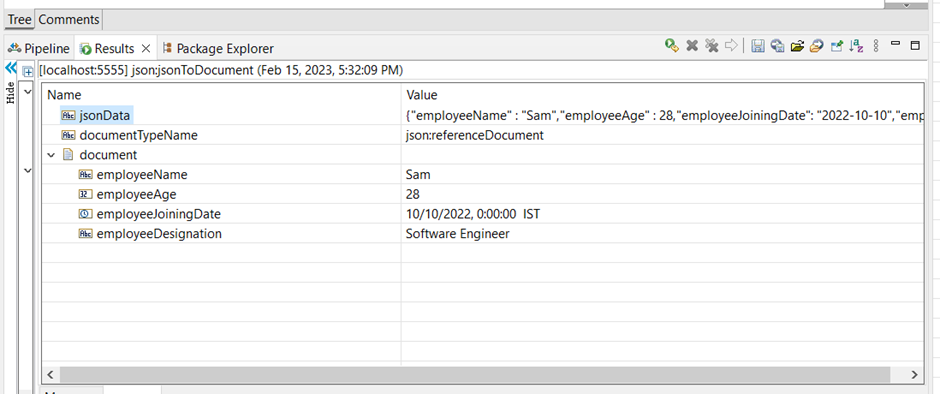
Note: Here the “employeeJoiningDate” JSON input String field is converted to Date in the output because the reference document has a reference to date type.
Case 2: Convert a JSON input to an IData by referring to the document, where input has a duplicate field:
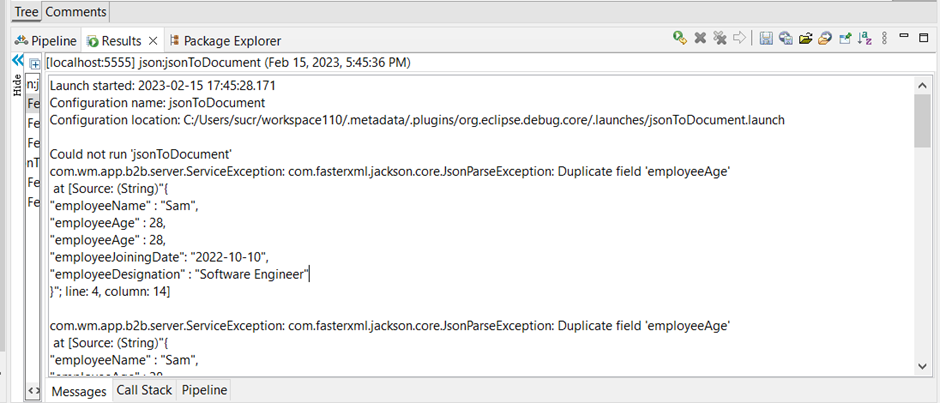
When there is a duplicate field in the JSON Input the “pub.json:jsonToDocument” service throws the an exception .
Provide the JSON input as:
Contains employeeAge as duplicate field.
{
"employeeName": "Sam",
"employeeAge": 28,
"employeeAge": 28,
"employeeJoiningDate": "2022-10-10",
"employeeDesignation": "Software Engineer"
}
Now in the output, we can notice an error, stating that a duplicate field is not allowed, and there is a parser exception.
Case 3: Convert a JSON input to an IData by referring to the document, where the reference document has a duplicate field:
When there is a duplicate field in the reference document the conversion happens by considering the first suitable match, In this case, the first duplicate field is of type int and the second one is of type long, Therefore the JSON input conversion considers the int type as it is the first suitable match.
Following is a sample reference document that has “employeeAge” as a duplicate field:

Provide the JSON input as:
{
"employeeName": "Sam",
"employeeAge": 28,
"employeeJoiningDate": "2022-10-10",
"employeeDesignation": "Software Engineer"
}
Now the output gets generated by considering the first suitable match, that is, the Int type.

Case 4: Convert the JSON input to an IData by providing the decodeAs fields:
Provide the JSON input as:
{ "employeeName" : "Sam", "employeeAge" : 28, "employeeJoiningDate": "2022-10-10", "employeeDesignation" : "Software Engineer", "isReferral" : true }
Here the decodeIntegerAs field is set to String and the decodeBooleanAs field is set to Boolean


Now the output contains all the integers in the JSON input as String and all the Boolean values in the input as Boolean.


